Settings & IDEs
The web UI has two configuration areas:
| Page | Route | Purpose |
|---|---|---|
| Settings | /settings | Which AI tools you use and where their config lives |
| Repositories | /repositories | Git catalogs to clone and manage |
Skills and Agents pages install artifacts from a selected repository into every enabled IDE.
What do you use?
On Settings, enable one or more tools:
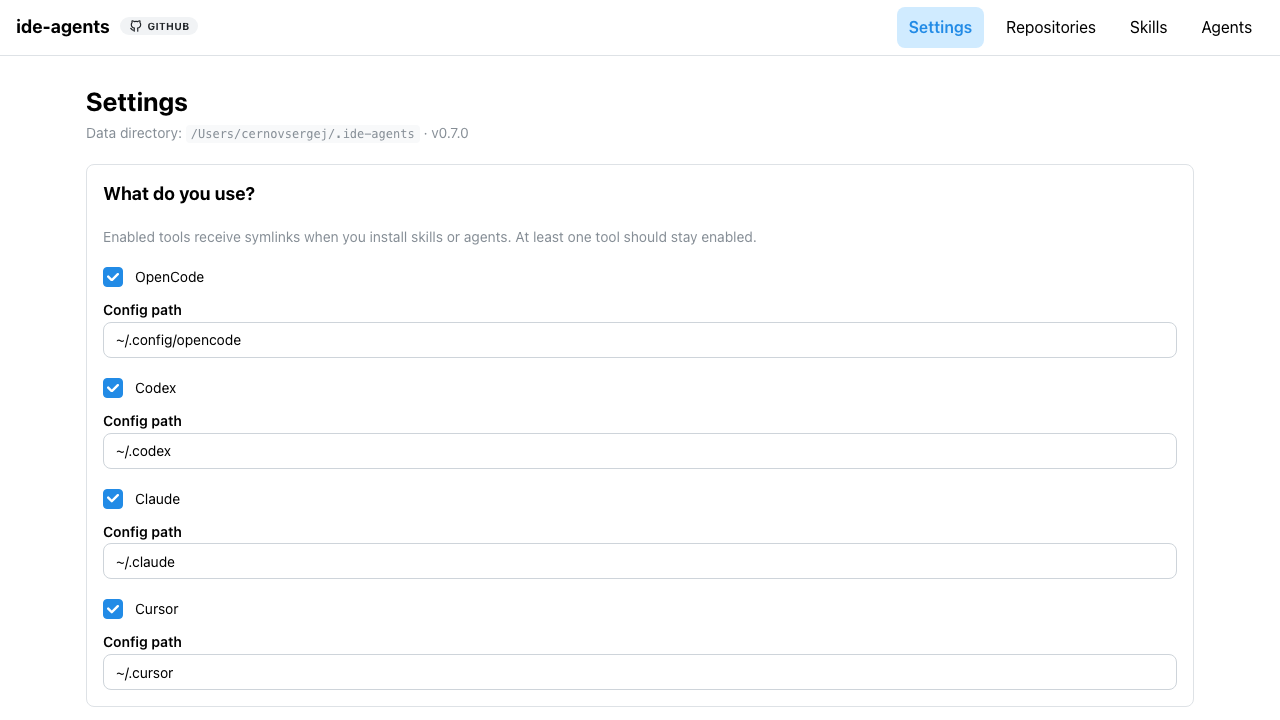
| Tool | Default config path | Enabled by default when |
|---|---|---|
| OpenCode | ~/.config/opencode/ | Directory ~/.config/opencode exists |
| Codex | ~/.codex/ | Directory ~/.codex exists |
| Claude | ~/.claude/ | Directory ~/.claude exists |
| Cursor | ~/.cursor/ | Directory ~/.cursor exists |
Defaults are not “all on”. On first run (no ides block in config.json), ide-agents scans your home directory and checks those four folders. Already saved settings in config.json are kept as-is.
You can change paths (e.g. ~/custom/.cursor). Tilde (~) is expanded on save. At least one tool must stay enabled.
Changes save immediately; saving triggers POST /api/apply so existing installations are synced to the new set of tools.
When a newer ide-agents is published on npm, Settings shows an update banner with npm update -g ide-agents (also returned as npmUpdate from GET /api/status and GET /api/settings).
Where symlinks go
Each tool uses its config path for global installs. Project installs use a subfolder under the project root (launch directory from the CLI — see Architecture).
| Tool | Global skills | Global agents | Project subfolder |
|---|---|---|---|
| OpenCode | {configPath}/skills/<name> | {configPath}/agents/<name>.md | .opencode |
| Cursor | {configPath}/skills/<name> | {configPath}/agents/<name>.md | .cursor |
| Claude | {configPath}/skills/<name> | {configPath}/agents/<name>.md | .claude |
| Codex | {configPath}/skills/<name> | {configPath}/agents/<name>.md | .agents |
Example with default paths and skill tech-debt:
- OpenCode global:
~/.config/opencode/skills/tech-debt - Cursor global:
~/.cursor/skills/tech-debt - Claude global:
~/.claude/skills/tech-debt - Codex global:
~/.codex/skills/tech-debt - Project (Cursor, cwd
/app):/app/.cursor/skills/tech-debt
Skill folders use directory symlinks; agent files use file symlinks.
One installation record applies to every enabled IDE — toggling Global or Project on a skill/agent card is per artifact, not per tool.
Project .gitignore
When you install an artifact with Project, ide-agents adds the symlink path(s) to the project’s .gitignore under:
# ide-agents (managed — do not edit manually)
This keeps IDE config symlinks out of git without touching the rest of your ignore rules. Entries are removed when you deactivate the project install. See Architecture.
config.json: ides
{
  "ides": {
    "opencode": { "enabled": true, "configPath": "/Users/me/.config/opencode" },
    "cursor": { "enabled": true, "configPath": "/Users/me/.cursor" },
    "claude": { "enabled": false, "configPath": "/Users/me/.claude" },
    "codex": { "enabled": true, "configPath": "/Users/me/.codex" }
  }
}
The legacy adapter field is still written for compatibility (first enabled tool: cursor → claude → codex → opencode).
API
| Method | Path | Description |
|---|---|---|
GET | /api/settings | Current ides, folder-based defaults, home, version, npmUpdate |
PUT | /api/settings | Replace ides { opencode, cursor, claude, codex } |
GET /api/status also includes ides, version, and npmUpdate (from package.json + npm registry, cached 24h).
Skill format across tools
Source repos use the shared Agent Skills layout (SKILL.md + frontmatter). The same git catalog can feed OpenCode, Cursor, Claude Code, and Codex when each tool is enabled in Settings — see Source repositories.